

When you’re running a small business, time is a precious luxury you can’t afford to waste, which is why mastering time tracking for your interior design business can be your secret to success. IDnest’s time tracking tools are designed to streamline design business operations, making it easier to log hours, manage workloads, and ensure accurate invoicing.
As part of The Dove Agency solutions, IDnest for interior designers offers intuitive features that transform time management from a chore into a strategic advantage. If you’re looking to enhance productivity, minimize billing errors, and focus more on creating beautiful homes, this guide will show you how to master time tracking with IDnest. Drawing from proven practices, we’ll explore step-by-step strategies, benefits, and tips to help you leverage this powerful tool.
Getting Started with IDnest Time Tracking | Your Foundation for Efficiency
The first step to mastering IDnest time tracking is understanding how to access and set it up, and that’s where the platform’s user-friendly design truly shines. Time tracking is accessible from the left-hand menu, making it simple to integrate into your daily routine. For interior designers, this means you can start logging tasks in minutes, without the need for extensive training.
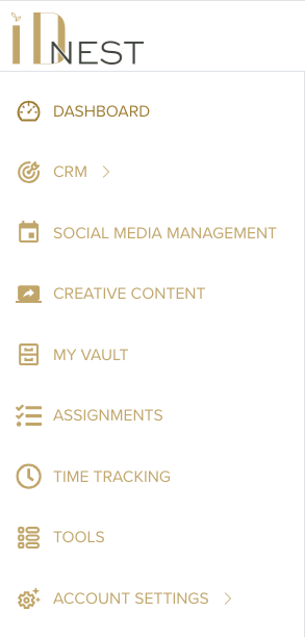
To begin, select “Time Tracking” from the menu, where you’ll find a dedicated interface for managing your hours. Owners and admins can configure settings via the gold cog wheel icon, allowing you to define billable and non-billable task types tailored to your firm’s needs. This customization is a key benefit of IDnest for interior designers, as it lets you categorize tasks like client meetings, design revisions, or vendor follow-ups, ensuring every hour is accounted for accurately.
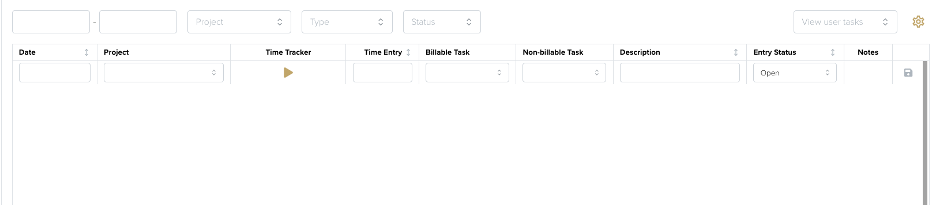
Once set up, the dashboard provides an overview of your entries, with filters for date ranges, projects, and task types. IDnest allows standard users to view their own entries while admins can oversee the team, promoting transparency without micromanagement. This foundational setup not only saves time but also builds confidence. By integrating time tracking with your project management system, you can link hours to specific jobs, creating a holistic view of your workload. This feature minimizes errors and supports better decision-making, helping new users quickly adapt and experienced designers optimize their processes.
Step-by-Step Guide to Mastering Time Entries in IDnest
Step 1:
Start by entering the required fields: select a date, choose a task type (billable or non-billable), and add a description if needed. This step ensures your records are accurate and actionable, turning time tracking into a seamless part of your routine. For interior designers, the real magic lies in the optional fields, such as linking entries to a specific project. This integration makes it simple to associate hours with ongoing work, like fabric sourcing or client presentations.
Step 2:
Use the timer feature to track time in real-time—just click the arrows to start, pause, or stop—and the system will automatically calculate totals. IDnest time tracking also includes status options like “Open,” “Requires Attention,” or “Ready for Approval,” which streamline workflows and reduce oversight.
Step 3:
Edit or approve entries, by navigating to the filter tools at the top of the page. Filter by date range or task type to review your logs, then use the batch approval feature for efficiency—perfect for busier firms. We recommend saving entries before exiting, and once approved, they integrate with invoicing tools, ensuring billable hours are accurately reflected in client statements.
Step 4:
Mastering this process means incorporating best practices, such as adding notes for team collaboration or setting entries to “Requires Attention” for quick reviews.
By following these steps, you’ll not only track time effectively but also gain insights that inform pricing and profitability, empowering your business to grow.

The Benefits of IDnest Time Tracking | Boosting Productivity and Profitability
Beyond the basics, IDnest time tracking offers benefits that make it the best interior design software for professionals aiming to optimize their day. One major advantage is the ability to push approved entries to project management, where they appear as billable items. This integration means interior designers can invoice for time spent on design fees or consultations without manual transfers, saving hours and reducing errors.
For teams, IDnest time tracking promotes collaboration through shared views and approval processes, fostering accountability while maintaining flexibility. Owners can batch approve entries, making it easier to manage payroll or client billing in growing firms.
Another benefit is the insight into employee performance in the Employee Profitability Tool. IDnest time tracking provides the data to report the billable and non-billable hours of an employee against their targets, with color-coded indicators for quick analysis—green for meeting goals, red for falling short. This data-driven approach helps you identify trends, adjust workloads, and improve profitability, all while streamlining design business operations.
In practice, mastering time tracking with IDnest means more than just logging hours; it’s about gaining a competitive edge. We suggest completing monthly analyses within the first few days to maintain accuracy, allowing you to track long-term trends and make informed decisions. Whether you’re a solo designer or part of a team, these benefits empower you to focus on what matters most: delivering unforgettable interiors for your clients.
Advanced Tips and Integration for Long-Term Mastery
One key strategy is using the timer for non-sequential entries, ideal for interior designers handling fragmented tasks like site visits or revisions. We recommend combining this with project management integrations, so time entries automatically feed into budgets and reports, creating a cohesive system.
Integration with tools like QuickBooks ensures seamless invoicing. By mastering these advanced features, you’ll streamline design business operations and build a foundation for sustained growth.
Tap into the Power of Time Tracking with IDnest
Mastering time tracking with IDnest is a transformative step for interior designers, offering tools that streamline design business operations and drive efficiency. From getting started and entering hours to leveraging benefits and advanced integrations, IDnest time tracking empowers you to manage your time with confidence and precision.
Ready to take control? Explore IDnest’s features today and schedule a demo to see how it can elevate your interior design business.