
The IDnest client dashboard is a powerful, intuitive home base that’s designed to streamline design business operations and provide executive-level insights at a glance. As part of The Dove Agency solutions, IDnest offers a user-friendly interface that transforms complex data into actionable strategies, helping you focus on creativity rather than administrative overload.
If you’re wondering how to navigate your IDnest client dashboard effectively, you’re in the right place. This blog will guide you through the process step by step to ensure you’re equipped with the knowledge to maximize every tool. By mastering your dashboard, you’ll not only enhance efficiency but also position your business for growth.
How to Get Started | Accessing and Understanding Your IDnest Client Dashboard
The first step in navigating your IDnest client dashboard is knowing how to access it. The dashboard is your go-to hub for overseeing all activated tools, providing a visual snapshot of your business’s performance relative to custom thresholds. To begin, log into your IDnest account—it’s straightforward and secure, ensuring you can jump right in without unnecessary delays.
Once logged in, locate the dashboard option at the top of the left-hand menu bar. Click it to enter your personalized view, where color-coded widgets display key metrics for areas like project management, CRM, and social media. This immediate access is a hallmark of IDnest for interior designers, as it minimizes navigation time and lets you dive into insights quickly. This setup is designed for efficiency, with tools appearing based on what you’ve activated, so your dashboard reflects your specific needs.

Understanding the layout is key to effective navigation. The dashboard overview uses color-coded indicators to highlight performance: green for growth (areas exceeding thresholds), red for concerns (metrics below targets), and black for stability (no significant changes). This visual system helps you identify priorities at a glance, whether it’s a project running over budget or a social media campaign gaining traction.
The confidence in navigating this comes from its user-centric design. Even if you’re new to the platform, the dashboard’s intuitive structure—complete with a return button for easy navigation—makes exploration feel empowering rather than overwhelming. This feature alone can save hours weekly, allowing you to focus on client relationships and innovative designs.
Exploring Key Features: From Overviews to Detailed Insights
Once you’re in the dashboard, the real magic happens as you explore its features. Let’s start with the Overview page. This section greets you with widgets that summarize your tools and metrics, making it easy to assess your business’s health. For instance, if you’re managing multiple interior design projects, the dashboard allows you to view detailed insights into areas like vendor performance and project profitability, all color-coded for quick interpretation.
Navigating deeper, each widget includes a “View Details” button, which takes you to in-depth pages for specific tools. Let’s say you’re focusing on social media management; clicking this button provides trends and analysis that help you refine your digital strategy. This feature is particularly useful for interior designers who need to balance creative content with business metrics, ensuring your efforts align with growth goals.
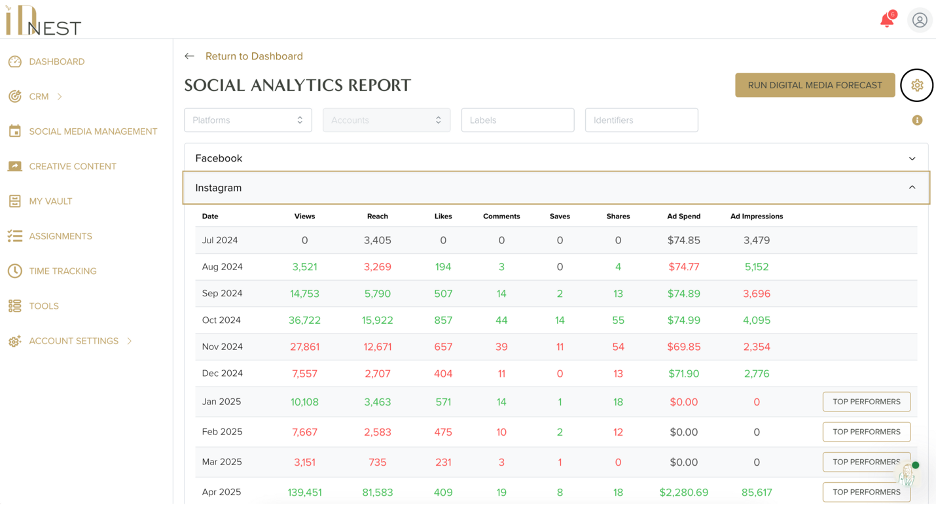
Setting thresholds and goals is another standout aspect. To customize, click the cog wheel icon on any tool’s page—it’s consistently located in the top right corner for easy access. Here, you can define targets based on your business objectives, such as budget limits or engagement rates. This process, empowers you to tailor the dashboard to your workflow, turning it into a proactive tool. For example, if a project’s metrics turn red, indicating it’s underperforming, you’ll get immediate alerts to adjust course, preventing potential issues before they escalate.
Customizing Your Experience: Personalizing the Dashboard for Maximum Impact
Customization is essential to truly make the IDnest client dashboard work for you. Start by setting up your preferences in the dashboard settings, where you can adjust thresholds. This level of personalization is a key part of The Dove Agency solutions, ensuring that your dashboard evolves with your business needs. We recommend using filters to focus on specific data to make navigating large datasets effortless.
Advanced navigation tips combined with the platform’s color-coded system, allows for efficient monitoring of metrics like employee profitability or cash flow. By customizing, you’ll streamline design business operations, making your daily routine more intuitive and less time-consuming.
The empowering aspect here is how these customizations foster a sense of control.

Experience the Full Potential of Your IDnest Client Dashboard
Navigating your IDnest client dashboard is straightforward, empowering interior designers to streamline design business operations and achieve greater efficiency. From accessing the overview to customizing features and applying best practices, the dashboard’s design makes it the best interior design software for modern professionals.
We encourage you to explore these tools fully and schedule a demo to see how IDnest can transform your workflow. Let your dashboard be the key to unlocking your business’s potential.